Showing posts with label resources. Show all posts

Sunday, 19 February 2012

Navigating New Networks

Navigating the Panmure Roundabout - click for a birdseye

It has been an exciting couple of weeks. Joining a new team, visiting new schools, new learning and giving my Google Maps App a daily workout navigating new routes...and the notorious Panmure Roundabout!

I'm thriving on the new learning opportunities as a result of growing my professional learning networks. Lots of learning for us all including 1:1 Netbooks, Google Apps for Education, Teacher Dashboard and some new Mac users too!


Below are some resources I have shared over the past week. Your recommendatiosns appreciated, use the blog comments to share more.

Wednesday, 14 September 2011

Jogging Digistore

I have been organising web content for upcoming PD sessions and remembered this useful web tool JOG THE WEB which I discovered last year and used to create the following tour. With JOG THE WEB you are able to group and organise web content plus include comments and feedback.

If you are new to Digistore this tour created in JOG THE WEB  is designed to highlight some of the key features and support material to get started.

Click to view Digistore Jog

Sunday, 7 August 2011

"Fantastic turnout for #EduCampAKL" via @lenva

Teacher Dashboard
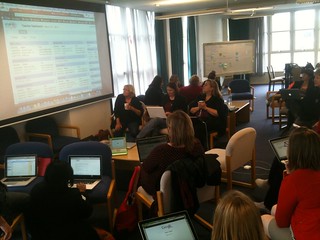
Posting to organise and record some of the excellent contributions from EduCampAKL yesterday. Ka nui te mihi to everyone who participated and contributed, you continue to inspire me.

Also thanks to our hosts @ClaireAmosNZ and the IT team from Epsom Girls Grammar who worked wonders with the network when around 80 of us (with multiple devices) descended for the Smackdown at 10am.

For those of you who like to take time and explore, the EduCampAKL wiki includes a multitude of links and resources shared on the day. I have also summarised and book marked contributions in My Delicious below.

Monday, 4 July 2011

@myen - archiving my tweets on the run

Posting in response to a question from @JoBrodie: How did you set up the Twitter archive in Evernote?

Twitter is dynamic and typically I don't save tweets rather the links and resources, recommended by my PLN are saved to Delicious.  Sometimes I favourite a tweet in Twitter (although not a great solution for sharing and categorising to revisit later)

There are tools for archiving tweets  however I was looking for a way to collate specific tweets from an event so I could save quickly and share them later. I decided to try using EverNote by syncing my account with Twitter. 

At events like EduCampNZ  the Twitter #tag is an effective way for participants to share with each other as well as those who are attending virtually.

During EduCampTaiTokerau I followed #EduCampTT . Any tweets I wanted to keep were either re-tweeted (RT) with @myen included in the tweet or I sent a direct message (DM) to @myen

Each tweet was saved in a new Evernote notebook, so I did have to copy and paste them into one notebook to share. It would be ideal if the tweets could be saved to a single notebook or online document for sharing. Any suggestions, please let me know.

This worked for me as EduCampNZ events are fast and furious and I was able to respond on the spot to a tweet, saving them in one place, to review later.

Here's how from the Evernote blog:

Wednesday, 28 July 2010

Learning, Links and Laughs @ EduCampNZ

"Go with the flow, follow your passion, take responsibility for your own learning"...three tips from unconfernece.net as we headed into our e-Learning un-conference, EduCampNZ, on Saturday 24th July.

Hosted at Summerland School in West Auckland, over 70 inspirational educators participated and contributed to a day of learning, links and laughs. We kicked EduCampNZ off with SpeedGeeking. Using TwitterTime each participant had 140 seconds to introduce themselves and share what is currently on their radar.

We also introduced a Smackdown to EduCampNZ this year after Dorothy, Rocky and I had participated in similar sessions at the ISTE conference last month. Both these sessions provided opportunities to connect with others and identify similar interests to pursue throughout the day.

'Everything EduCampNZ' can be explored from our wiki including a shared Google Doc with links and contributions from participants, The Smackdown WallWisher, #EducampNZ Twitter stream and photos.

We would also appreciate your suggestions and feedback to assist the organisation of future un-conference events. We are excited that educators in other regions are exploring the possibilities of running similar events and your recommendations would be valued. Feedback can be posted on the wiki.

I want to again acknowledge the generosity of all participants... from the staff and students of Summerland Primary, to the educators who contributed especially those that travelled from beyond West Auckland... Arohanui.

The following video is my attempt to capture some of the EduCampNZ highlights! Because it was shot on July 24, 2010 I have also submitted it to Life In A Day, a project documenting a single day on earth.


Monday, 31 March 2008

NZ Interface


It was very exciting to see Sunnybrae Normal School's hand message project referenced in the latest edition of NZ- Interface. Well done Stephen and Room 12!
You can access the article written by Sarah Jones from the MoE's eLearning team online.

NZ-Interface is a quarterly magazine that includes reviews, comment and links to online resources specifically relevant to NZ schools but also includes international trends and issues that are topical.

Teachers in NZ schools can register for a free copy of NZ-Interface online here.

Also if you look on page 11 you can see Lynne Thomas (and her new Mac) caught on location at the Bloggers Cafe at Learning@School.

Monday, 13 August 2007

Sometimes a video speaks louder...

Working with some facilitators the other day and was asked where I source video clips I sometimes use for presentations and workshops. If I find them online I usually download and save the source in Delicious.

The wonderful Wes Fryer must have EBP (Extra Blog Perception) as he has generously posted and categorised a list of videos he uses on his wiki Moving at the Speed of Creativity...great stuff, I particularly liked "The Internet has Crashed"...thanks Wes.

Also my Delicious video links are online here. I have categorised these under themes eg: tutorials, comments, stories etc.

Another great place to start sourcing online video is from TED (Technology, Entertainment, Design) which brings together the world's most fascinating thinkers and doers, who are challenged to give the talk of their lives (in 18 minutes). These videos from TED are great discussion starters and have also been collated on YouTube as the TEDtalks Director's picks.

Sunday, 17 June 2007

Bad Guitar Players and Bigger Amplifiers

During our last cluster share at Sunnybrae Normal, Stephen demonstrated his use of the Visual Portrait of Story (VPS). I wanted to expand a little on the source of the VPS and its relevance. 

I attended a digital storytelling workshop with Jason Ohler in 2005 and something he said about technology has stuck with me ever since. 
"Technology can be like giving a bad guitar player a bigger amplifier" (Source: Then What?). Just because we can 'flash up' a presentation with animated graphics and sound, this does not automatically improve the learning, quality of the content or message we are attempting to communicate. 

Jason also discusses this concept in his article, Art becomes the Fourth R (recommended reading), stressing the importance of the teacher's role. Jason writes... "... although multimedia can act as an assistive technology, it cannot take the place of vision, talent, or skill, whether developed or inherited. We will always need to tell a story with our art and to tell it with honesty, depth, and detail if it is to survive as more than a transient, disconnected thought. For this reason, teachers will become more important as technology increases in power. More than ever, students will need teachers for their wisdom and knowledge to help navigate a purposeful path through the glitz and distraction". 

So within the context of digital story telling, Jason introduced us to the VPS. In short, this was added in to the traditional story planning process, after coming up with the idea but before storyboarding or outlining the script. Since then I have used the VPS with students for digital story telling presented through a variety of software from iMovie and PhotoStory to ComicLife and animation.

Key to the VPS is that it supports the necessity of a good story to include the main character experiencing some kind of transformation. If you look at the VPS and match a familiar story you will see what I mean. After using a similar strategy with students, I give them a hard copy to draw on and 'plan the pitch' for their story, the VPS has become a crucial step in pre-production, however its impact can be evident throughout the production process. Below is an example of a well know story applied to the VPS. 


 If you are interested in reading more I have shared a copy of the VPS. I would like to thank Jason Ohler for providing me with one of my 'Aha'! moments. Also as I was locating the links to Jason's articles for this post I noticed he is a Keynote speaker for TUANZ 2008 ...see you there.

Friday, 9 March 2007

New DVDs for schools


Look out for these DVDs in your school shortly. The 21st Century Learner supports the MoE's eLearning Action Plan that was published last year. The NetSafe Kit for Schools is designed to assist school communities to provide for safe use of the Internet.