Monday, 16 March 2020

Tuhi Mai Tuhi Atu 2020 - Nau mai, haere mai, piki mai

Room 5 @ Ruapotaka School
Spotted @ School this week 

Room 5 @ Ruapotaka School share some of their favourite posts from one of their
Tuhi Mai Tuhi Atu team's blog Ruaumoko @ Makara School


Spotlight on Google Hangouts Meet, one of the Apps available in GSuite. I encourage you all to explore how you might harness Google Meet to turbo charge learning in your practice. This week's update includes recommendations for getting started.


Tuhi Mai Tuhi Atu Weekly Tips

Monday, 2 December 2019

Support your learners to create original content for their blog posts

Today the Summer Learning Journey Teaser (SLJ) activities go live. This is open to any of our learners with individual blogs regardless of whether they have registered for the Summer Learning Journey. The teaser activities are an opportunity for your learners to familiarise themselves with the SLJ activities.

Plus we have created a page on the Cybersmart site sharing ideas to help learners use what they have learnt to create a Digital Learning Object for their blog post. Please support your learners to create original content for their blog post rather than copying and pasting the SLJ activity content.

Open page link

Each DLO includes a link to an example on a learner’s blog. Thank you to teachers and learners from Panmure Bridge School, Ruapotaka School, Glen Innes School and St Bernadette's School in Christchurch whose blogs we have referenced.

The Summer Learning Journey activities will be available to download to enable offline access. Take time during the Teaser Week to ensure your learners can confidently access and manage their learning both offline and online. See Google Drive Offline

The SLJ Teaser week is also another awesome opportunity to connect with your Tuhi Mai Tuhi Atu buddies from 2019 and comment.

2019 Participation Badge for your blogs

Monday, 11 November 2019

Let's go to the Movies!

Look out for Film Festivals in Manaiakalani and Toki Pounamu this week!
Participating and contributing to annual Film Festivals is a highlight of the year in a number of our clusters. In addition to celebrating together on the day, all films are shared on our blogs. Viewing and responding to festival films is another opportunity for our young people to connect with an authentic audience.
Take some time to focus on the elements of a film to emphasise key vocabulary for commenting.
Access Slide Links


Tuhi Mai Tuhi Atu Weekly Tips

Monday, 28 October 2019

Creating and sharing their own media empowers learners to be media literate

This week's blogging tip focuses on Being Cybersmart: Smart Media

Engaging all learners in conversations about media and the construction of media enables valuable opportunities to understand why it is important to recognise who the creator is.
Identify opportunities to start this conversation with your learners early.
In Years 1-3 creating and sharing their own media via the class blog enables learners to connect with and respond to each others' learning as creators of media.

Access Slide Links

Attributing Images is especially important if your learners have their own blog. Take time to empower your learners to select and attribute images if they are not creating their own.
Access Slide Links

Monday, 21 October 2019

Creating Collages with Textured Images

This week's awesome tip comes to us via Uru Mānuka and St Bernadette's School, thanks to Kelsey Morgan and Grace @ St Bernadette's School.
Grace has created a collage using images of textures and included Kelsey's helpful instructional slide deck. 
Plus Cybersmart tips for Smart Learners and Smart Media.


Access Slide Links

Monday, 14 October 2019

Ko te tū atamai i te ipurangi ki te ao ako, hanga, tohatoha

The Manaiakalani Education Programme's theme for Term 4 2019 is "Being Cybersmart in a Learn Create Share World". 

Ko te tū atamai i te ipurangi ki te ao ako, hanga, tohatoha, empowers our learners to make smart decisions and understand that every time they connect, collaborate and share online it combines to create their digital footprint.
This is timely as our government launches a nationwide focus with a Cyber Smart Week to coincide with Digital Citizenship Week from the 14-18 October.

Please continue to harness your blogs and participation in Tuhi Mai Tuhi Atu to engage learners in Being Cybersmart. While we have focused on our three key cybersmart categories throughout the year - Smart Learners, Smart Footprint and Smart Relationships - continuing to  identify opportunities for learners to practise being cybersmart as they Learn Create and Share is critical.
As you plan, try to identify opportunities to include Being Cybersmart starting with any of our Weekly Tips over the past three terms. Also if your learners have individual blogs take some time to ensure they are confident with navigating, posting and commenting. Plus identify opportunities within your exisiting learning programmes to connect with the elements of a quality blog post and additional Cybersmart categories.

Tuhi Mai Tuhi Atu Weekly Tips

Access Slide Links

Monday, 23 September 2019

Learning Anytime and Any Place

Empower your learners to continue learning, creating and sharing with their blog throughout the school break. If you're taking some time away from your device schedule posts for the class blog too.  


Access Live Links


Wednesday, 18 September 2019

Why copy and paste from a Google Doc to Blogger?

There are advantages to using a Google Doc to prepare text for a blog post.

Crafting or composing a text in a Google Doc creates a saved copy for both the learner and teacher.

This copy is a record of what has been written and provides access to the Version History of the document.

Viewing a document's history provides valuable information about how the learner has edited their writing and supports reflecting on and editing text.

Scaffolds can be included in the document for learners e.g. voice typing, writing prompts

Commenting in Google Docs can also be harnessed for feedback and feedforward to support the learner as they write.

If there are any internet issues when publishing in blogger a copy is saved in Google Drive.

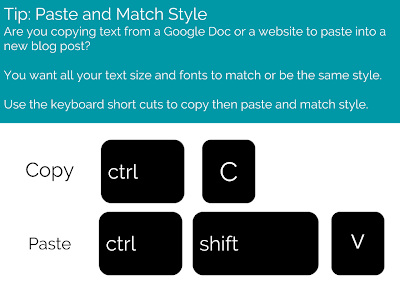
Don't forget to Paste and Match Style. Once the text has been pasted into the Blogger post editor, use the Blogger editing tools to format text.

Tuhi Mai Tuhi Atu Weekly Tips 


Monday, 9 September 2019

Viewing Student Blog Activity in Hāpara Dashboard

Screen_Shot_2019-09-05_at_12.46.00_PM.png

Using Hāpara’s Teacher Dashboard to view learners' blog posts and monitor comments from Blogger, enables teachers, as blog administrators, to access and view all blog posts and comments in one place.

This article from Hāpara includes screenshots and brief explanations of what you are able to view, including useful features teachers can harness to support Cybersmart learning e.g.

  • Published posts and drafts with dates. Display Dashboard on the big screen to draw learners attention to when they last published a post. Our goal is to share three posts a week.
  • Draft posts display with a green pencil next to the last update. Remind learners that posts should be published regularly and set expectations for draft posts to be published.
  • Posts without titles.  Support learners to edit posts and include a title. 
  • Blog titles create a unique URL for the specific blog post. Include keywords that explain what the post is about
  • Keep titles short and concise, this will be more readable for users and won’t get cut off in feeds.
  • Anonymous comments highlighted in red as an alert. Sometimes parents will post as anonymous if they don’t have a Google account. 
We highlighted Monitoring Blog Comments in a previous tip. As admin of learners’ blogs teachers should be receiving email notifications when comments are posted on your learners’ blogs. If not please subscribe to blog notifications for all learners’ blogs. 

Tuhi Mai Tuhi Atu Weekly Tips 
Screen_Shot_2019-09-05_at_12.49.44_PM.png
Viewing Student Blog Activity in Hapara Dashboard

Wednesday, 4 September 2019

Tohatoha - Connected Learners Share

A valued element of sharing - kanohi ki te kanohi
It was all about the impact of sharing at our Manaiakalani Kāhui Ako, Connected Learners Share Staff meeting this week. 

The purpose of this hui was for our people to:
  • understand the impact of Share/Tohatoha for our learners and their wellbeing and achievement
  • connect with the valued elements of sharing, in the world we live in
"It is a basic human instinct to want to share. Sharing connects us to others both emotionally and practically" (Connected Learners Share)

As a Kahui Ako we acknowledge the valued elements of sharing identified by our educatorsWe also know sharing positively, makes a positive difference for our young people, their wellbeing and achievement. 
Additionally by recognising and embracing the increased options we have to share in today's world our young people are empowered to harness the digital to connect and share in ways that elevate the positive. 

Content and feedback from participants for our Connected Learners Share staff meeting:
Speed Dating